 Join The Community





I know this will upset some gatekeepers, but the Hyperkin Retron HD is a perfectly serviceable NES clone. I'm not saying it exactly mimics Ninty's OG best retro console contender, nor am I giving it a pass for some of its shortcomings. That said, I feel like this system could help new players start a collection or start using their old libraries for under $40, and you won't even necessarily need to look at upscalers.
Let me back up a bit, as I want to delve into my relationship with the Hyperkin Retron HD. I originally grabbed the NES clone back in 2017 for its HDMI abilities, as upscaling options back then were limited to cheap adapters or expensive, discontinued gadgets like the X-RGB Mini Framemeister. Upon tethering it to my LCD, I found that the colors were slightly off, albeit still acceptable compared to my original PAL Nintendo Entertainment System, but the killer con was ultimately the 2-3 frames of input lag.
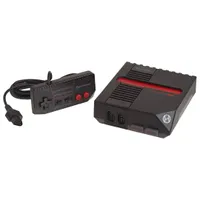
That latter caveat cut my Hyperkin Retron HD journey somewhat short, and I ended up giving the console to a friend. I effectively reverted back to only playing NES games on the OG system on a CRT TV, but having recently reacquired the clone, I decided the clone deserved a second chance to strut its budget stuff as a way to play Nintendo carts.


Despite coming in under $40, the Retron HD actually offers some really useful features. For starters, it's not just an HDMI machine, as it's rocking composite RCA outputs on the back too. That means if you do want to treat it exactly like an '80s NES and pair it with an old CRT TV, or even do the upscaling yourself using modern options like an OSSC Line Doubler, those setups are on the menu.
To give the Retron HD a chance to save itself from my crummy clone list, I ended up playing a few games on a Sony PVM CRT and an LG OLED panel. Upon loading up Mega Man 2, I was instantly reminded that Hyperkin's box looks pretty saturated compared to the original. That's not to say the visuals looked awful as a result, and if you caught my thoughts on how no one can come to a consensus on NES color accuracy, you'll get why it's a forgivable trait.
My usual benchmarks for NES console visuals outside of color are producing a clean signal with no "jailbar" lines, aspect ratio issues, or interference. The Retron HD manages to pass the bar in respect to all three, and that's more than I can say for my AV-modded Nintendo Famicom or that NASA clone console that keeps confusing people on the internet.


Keep in mind we're talking about a box that uses a System on a Chip (SoC) to emulate original NES hardware, so visual inaccuracies are a given. At least, that's the case for the weird knock-off plug-and-play consoles I've used over the years, as the Retron HD seems to dodge any of the real clone grievances. Music has tonal differences, but is largely the right speed if you use the PAL and NTSC selector switch at the bottom.
Convenience is at the core of the SoC devices like the Retron HD, so I wouldn't recommend it to enthusiasts who've built up tight accuracy expectations. I'm not even so sure players will want this system, specific for analogue AV output, as since it has HDMI baked in, it's more targeting those of you wondering how to connect a retro console to a TV or monitor. The Answer in this case is most certainly using the same cable as your PS5 or Switch, and the result offended me far less than before.
Look, I still have gripes with the Retron HD's scaling over HDMI. It's absolutely subject to the same soft edges you get from letting slightly older flat screens handle upscaling, and that looks naff on larger panels. What did catch me off guard, though, is that the 2-3 frames of lag feel less aggressive compared to my old Samsung LCD screen, and it felt closer to something like the NES Classic Edition.

The one other major flaw of the Retron HD is game compatibility. That's something that still haunts the company's systems, as even its latest Hyperkin Retron GX PC Engine remake lets the side down. Simply put, already problematic releases like Battletoads aren't going to fly, and I found that region switching can also be temperamental (nothing toggling the switch bag and forth couldn't fix, but still).
One thing I can't check right now is the Retron HD's matching controller; it's currently AWOL. I've been using a real NES gamepad since this machine uses the OG ports, and trying to survive in Mega Man 2, and it feels just like the '80s system. The credit for that belongs to me, though, the loser who regularly refurbishes every pad in their collection, so I'd expect the buttons to feel box-fresh.
Those drawbacks aside, I still think the Hyperkin Retron HD has a place in budget setups in 2026. Keep in mind, I'm one of those silly retro gaming journalists who's got the real McCoy to hand, so it's easier for me to write it off based on those above caveats. If I were starting from scratch, looking to play the games that started it all for Nintendo, I'd pick up a system that provides that for under $40 in a heartbeat, even if I'd be secretly longing for an FPGA system like the Analogue NT.
Itching to play NES games on the go? Swing by the best retro consoles for emulation systems and more.

You must confirm your public display name before commenting
Please logout and then login again, you will then be prompted to enter your display name.
