The Corsair Galleon 100 SD has made it into my hall of fame, joining the ranks of the best gaming keyboards I've tested so far with the top slot in the full-sized category. That's a long way of saying I've been testing it directly against the Razer BlackWidow V4 Pro (my previous go-to) and the Galleon has come out on top.
This is the second time in about as many months that I've added a new Corsair keyboard to my roster, the brand is clearly on a roll. This time, though, it's the addition of a full Stream Deck on the right side that has me itching to recommend it. At $349.99 it's more expensive than Razer's entry (and that's difficult to do), but in the right setup this is going to be an endgame device.
The best full-sized gaming keyboards
Troublesome value

Taken in isolation, the Corsair Galleon 100 SD is easily the best full-sized gaming keyboard on the market. However, it might not be right for your setup.
Essentially, I'm happiest recommending this premium deck to anyone who is also in the market for a Stream Deck. If you already have one of the launcher pads in your setup you're not going to feel the benefit of simply shifting an extra one onto your keyboard. Similarly, the Galleon makes the most sense for players who will actually use that screen and those two extra dials.
That's because, at launch, the versatility of these particular components is a little restricted by the lack of dedicated plugins and available controls. There's a whole world of opportunity here, but it hasn't been captured quite yet.
If you don't see yourself using the extra dials and display, picking up a cheaper deck and a separate Stream Deck Mk.2 is going to offer the same core experience at a far lower price. You can even upgrade those mechanical switches to magnetic ones if you go for something like the Logitech G Pro X TKL Rapid or NZXT Function Elite, adding adjustable actuation points and rapid trigger to your arsenal of weapons.
I still have to take my hat off to Corsair, this is a gold standard for controls and flexibility but whether or not it makes sense for your desk is another matter.
Corsair Galleon 100 SD vs Razer BlackWidow V4 Pro
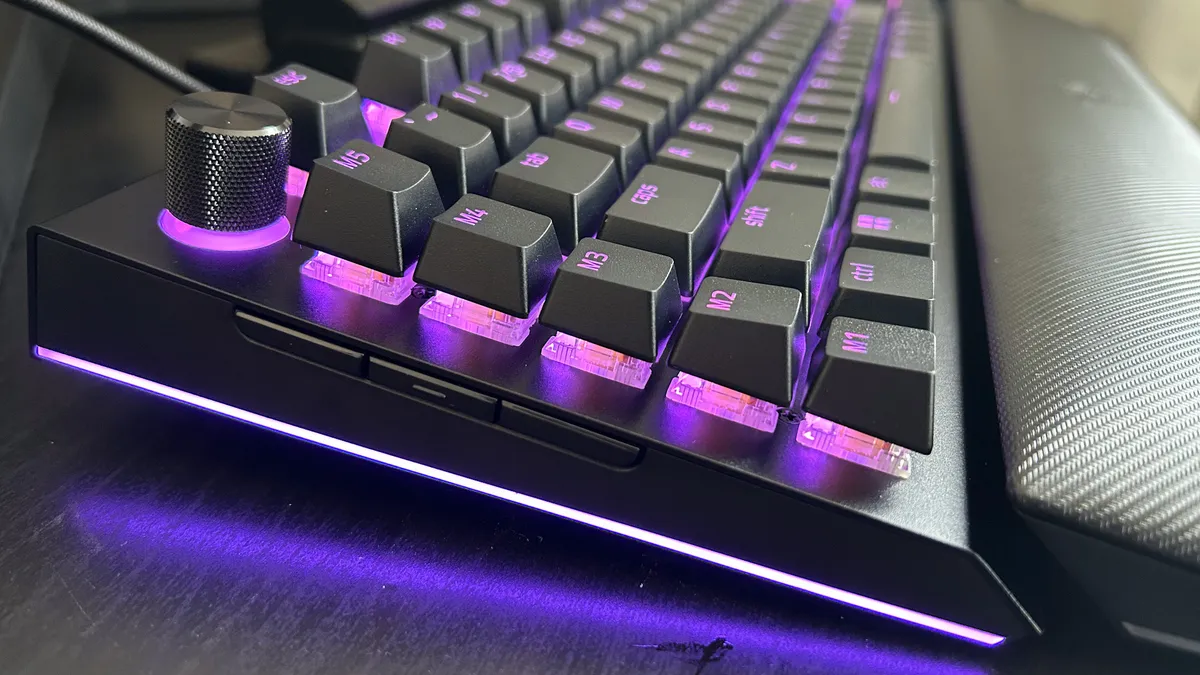
Corsair Galleon 100 SD
- $349.99 / £309.99
- Mechanical - Corsair MLX Pulse
- Wired
- PBT keycaps
- Two control dials
- 12 LED macro buttons
- Smaller form factor
Razer BlackWidow V4 Pro
- $249.99 / £209.99
- Mechanical - Razer Yellow / Green
- Wired
- ABS keycaps
- 4+1 control dials
- 5 macro keys, 3 macro buttons
- Larger form factor
After completing my Razer BlackWidow V4 Pro review back in 2023, it went straight to the top of my full-sized recommendations list. It's stayed there ever since, so it's testament to the BlackWidow that it took a full $350 Stream Deck-toting monster to knock it off its spot.
The BlackWidow is $100 / £100 cheaper than Corsair's premium deck, and that's a win that can't be ignored. However, if we're truly looking at which device offers the best experience the trophy has to go to Corsair. Razer impressed me with its massive selection of additional controls; four rotary dials, a volume scroll, five dedicated macro keys, and three further multi-function buttons on the side of the deck. That's a hell of a lot to play with, but Corsair has streamlined the whole endeavor.

It just feels better to use the Stream Deck integration on the Galleon. My commands aren't split into different places on the keyboard, I can configure handy LED reminders for different presets and toggles, and everything can be drag and dropped from the Elgato software. That's not even mentioning the fact that you've got access to the whole plugin marketplace, whereas Razer's scope is significantly more limited.
Let's move away from that Stream Deck bell, though. The Corsair MLX Pulse switches inside the Galleon 100 SD feel a little more robust than Razer's linear offerings, with a richer sound quality and more luxurious feel overall. Don't get me wrong, both offer fantastic typing experiences, but if you prefer a more textured thock Corsair's going to be your best bet.
Razer also carries its full-sized form factor a little further, which means less space on the desk itself. With those macro keys in a row on the left this feels like a much wider deck in use. When testing side by side, I've noticed my mouse hand knocking into the BlackWidow a little more often, and I've got a relatively large surface area. Those with a smaller desk can still benefit from all the additional controls without sacrificing too much play space with Corsair's alternative.
Buy the Corsair Galleon 100 SD if:
✅ You're a streamer or content creator
✅ You want as many controls on your keyboard as possible
✅ You have a regular sized desk
Buy the Razer BlackWidow V4 Pro if:
✅ You're investing, but you still don't want to spend $350
✅ You're not interested in Elgato plugins
✅ You want more dials than buttons
The rest of the best
The Corsair Galleon 100 SD actually joins the Corsair Vanguard Pro 96 in my recent additions to the top list. The Vanguard currently sits at the number one slot thanks to its fantastic magnetic switches, compact but versatile 96% form factor, and excellent typing feel.
If, however, you're looking for a cheaper alternative you can't go wrong with the Newmen GM326. While the Vanguard will cost you $350, this is a hot-swappable mechanical keyboard that can sometimes drop as low as $20. At that price I wasn't expecting much when I got it on the test bench, but this super cheap deck proves just how far budget accessories have come in 2026.
For those ditching the cables, the Asus ROG Azoth still reigns supreme. I'm yet to see the rest of the best wireless gaming keyboards even getting close to this keyboard's battery life, and it does so with a beautifully sound-dampened chassis, sublime typing feel, and a display that works far harder than the competition.
If you're after a little more versatility, check out the best hot-swappable keyboards on the market. Or, for something a little cheaper take a look at the best membrane keyboards I've tested so far. For a full setup refresh, take a look at the best gaming mouse models available.

You must confirm your public display name before commenting
Please logout and then login again, you will then be prompted to enter your display name.