
The best Hall effect keyboard on the market right now is the Asus ROG Azoth 96 HE. It's the best on paper and performed the best from my testing, but its wireless connection, sturdy battery life, versatile display, and top-of-the-pack typing feel comes at a price. This is a premium luxury, but it's so, so much more expensive than my second favorite.
That's why the Hall effect keyboard I'd recommend to most people is the Corsair Vanguard Pro 96. This is still a relatively expensive model, but so are pretty much all magnetic decks, but it's the best gaming keyboard I've tested so far overall, and offers 90% of the Azoth's charm at a good chunk of change less.
The quick list

The Asus ROG Azoth is the best Hall effect keyboard I've tested so far, topping the rankings for typing feel, features, and overall quality of life. It's certainly expensive, though.

The Corsair Vanguard Pro 96 will get you 90% of the way to the Azoth but at a much lower price point. It's still smooth under the fingertips and offers a compact 96% form factor that provides plenty of mouse swinging space.

The Endgame Gear KB65HE drops some of the dual-step actuation features of more expensive decks but still manages to offer adjustable actuation points, often for far less than $100.

With dual-triggers already set up to keep your arrow keys and a slick joystick mode that makes racing and stealth games all the more impressive, the Razer Huntsman V3 Pro Mini is the best 60% Hall effect keyboard I've tested.

The Ducky One X is a rare full-sized Hall effect keyboard with a smooth, soft typing feel and crisp, clean design. Its software doesn't quite hold up, but this is one for those who can't drop the num pad.

It's tough to find a truly hot-swappable Hall effect deck, but this PCB is open to both magnetic and mechanical clickers. That's perfect for anyone doubling up on their options.

I've been building, breaking, and customizing keyboards since I was a teenager, but as much as I'm interested in making decks feel nice, I'm always up for a keyboard that adds extra functionality. When Hall effect keyboards started making their way into the mainstream I took one look at those adjustable actuation points and dual-function triggers and fell in love. Since then I've been hands-on with all the latest and greatest releases, but base my top recommendations around value for money.
The best Hall effect keyboard overall


The Asus ROG Azoth 96 HE is the best Hall effect gaming keyboard I've tested so far, but it's had to fend off some stiff competition from Corsair to get here. In many scenarios I'd actually recommend the Vanguard Pro over the Azoth, but if you're going for the gold standard of magnetic decks there's no denying Asus has it in the bag.
✅ You prioritize typing feel
✅ You want a more spacious 96% layout
✅ A wireless connection is a must
❌ You don't need to drop the cable
❌ You prioritize value over typing feel
I'll get the TL;DR out of the way. The Asus ROG Azoth 96 HE offers the best typing experience I've had from a magnetic deck, while also piling on premium features you don't see elsewhere. That wireless connection is a rarity with these more power-hungry switches and the sturdy battery life saw me through a week of play at a time (far greater than the Ducky One X and comparable to the Cherry MX 8.2 Pro TMR Wireless). It's the sound-dampened, crisp PBT, super smooth experience I first fell in love with on the original Asus ROG Azoth - just with super-fast, versatile Hall effect switches.
It's an investment, though. The Asus ROG Azoth 96 HE has a price problem, coming in well below the $430 Asus ROG Falcata but still more than $100 higher than the Corsair Vanguard Pro 96 below. At $349.99 you need to really know you prioritize a best-in-class typing experience and wireless experience for this deck to make sense.
It beats Corsair in a key few areas, though. The 96% form factor is far less condensed than the keys on the Vanguard. There's real breathing room here, which in turn increases accuracy and reliability - I know where I am on the deck at all times, and that's just not the case for the Vanguard. That extra sliver between the arrow keys and number pad makes all the difference.
Then you've got the switches themselves.
The Azoth 96 HE uses Asus's ROG HFX V2 clackers, the same ones that captured my attention in the Falcata. They're the smoothest, most mechanical-feeling magnetic switches I've tested so far, and in the Azoth chassis they have a bounce and energy that's unmatched. I feel springy moving across this board, with the sensitivity of those adjustable actuation points making for a particularly speedy, but still satisfying, gaming experience.
If you're going all-out on the best Hall effect gaming keyboard, the Azoth is where you should be looking. If you want to get 90% of the way there for a lot less cash, though, I'd recommend the Vanguard instead.
Read more: Asus ROG Azoth 96 HE review
Speed | 5/5 |
Customization | 5/5 |
Typing feel | 5/5 |
Portability | 4/5 |
Comfort | 5/5 |
Controls | 5/5 |
The best Hall effect keyboard for most players


The Corsair Vanguard Pro 96 was the top dog before the Asus ROG Azoth 96 HE came onto the scene. With its plastic construction, wired-only connection, and under-utilized display it's not quite the best on the market, comparatively, but it's still the best Hall effect keyboard for more casual players who don't want to break past the $300 price bracket.
✅ You need plenty of extra controls
✅ You still want to keep your mouse hand free
✅ Typing feel is a priority
❌ A wireless connection is a must
❌ You need extra features from the display
The Vanguard thrives on its compact, but still button-heavy, form factor and excellent MGX V2 switches. Those clackers come second only to the Asus ROG HFX V2s inside the Azoth and Falcata, offering a super smooth keypress with a satisfying bounce and a real thocky feel. It's not quite as energetic as the softer options from Asus, but it's certainly more comfortable than the woolly options available elsewhere.
The main feather in this deck's cap is its functional but still space-saving layout. This is a squished 96% deck, giving you access to all your number keys, arrow buttons, and most navigation buttons, while still leaving mouse-swinging room to the right. Yes, it's a little cramped but it only takes a little muscle memory re-learning to get into the swing of those key placements, and I'd certainly take the five dedicated macro buttons while they're on offer.
So the Corsair Vanguard Pro 96 stands tall in its typing feel, actuation adjustment, and extra controls. Where does it fall down?
If you thought you were getting the same kind of OLED display experience as you would the Asus ROG Azoth 96 HE above, you'd be sorely mistaken. The panel on this model feels particularly under-utilized, only really offering some backgrounds and a volume dial. Compare that to the switch adjustment, media control, and system spec offering on Asus's model and the difference is pretty clear.
Still, with a wired connection and durable plastic chassis, the Corsair Vanguard Pro 96 comes in significantly cheaper than top-of-the-market options, without sacrificing core features and typing feeling. That's a win in my books.
Read more: Corsair Vanguard Pro 96 review
Speed | 5/5 |
Customization | 5/5 |
Typing feel | 5/5 |
Portability | 3/5 |
Comfort | 5/5 |
Controls | 5/5 |
The best budget Hall effect keyboard
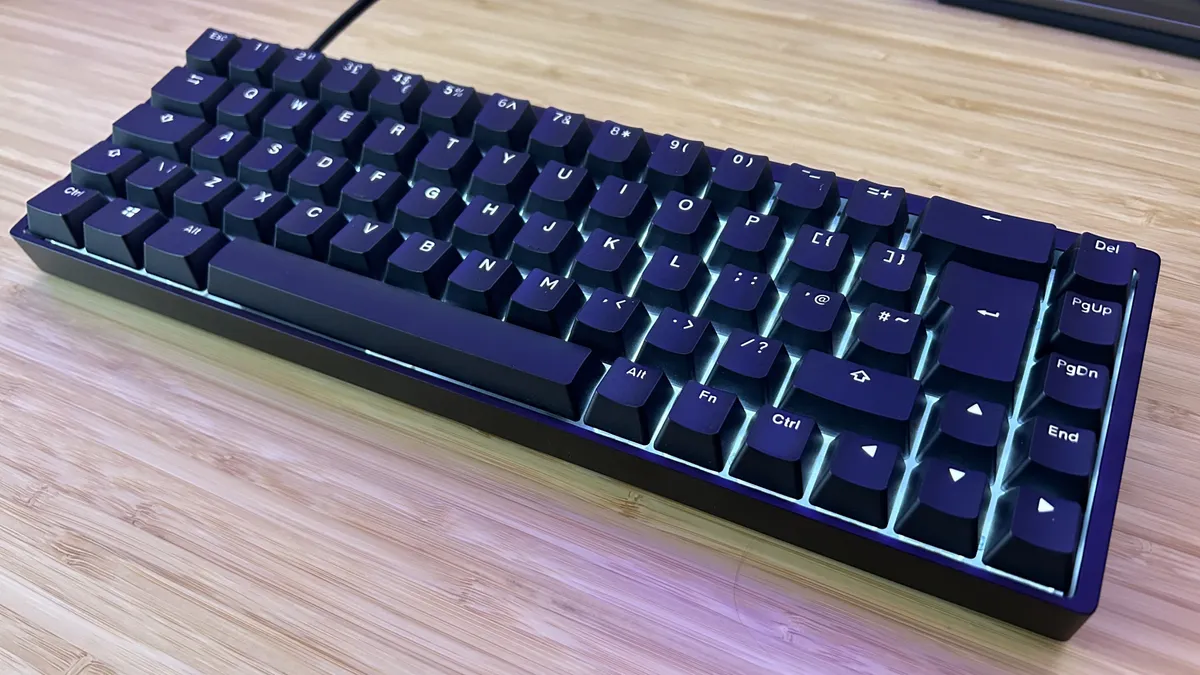


The Endgame Gear KB65HE is actually one of the first Hall effect gaming keyboards I tested, but that age means it's falling much further down the price scale compared to newer releases. I'll get this straight out the way, it's a lot heavier under the fingers compared to more modern models and you do drop dual-step actuation features. However, if you're looking to spend less than $100 / £100 on one of the best Hall effect gaming keyboards, it's still excellent value.
✅ You have a naturally heavier typing style
✅ You don't need dual-step actuation
✅ You prefer a more compact form factor
❌ You need multiple inputs per keypress
❌ You prefer a snappier typing experience
Everything about this deck is heavy, from the super dense brick of a chassis to the stiffer switches under the hood. That's not necessarily a bad thing. If you have a heavy hammer these are incredibly satisfying. I prefer a lighter touch and even I had a good time here.
It's rare to find magnetic switches in a gaming keyboard this far down the price bracket. You're usually looking at a $130 / £130 investment minimum (and that's with the heaviest of discounts applied). The Endgame Gear KB65HE keeps the basics (there are no dual-step actuations in here) while sporting a commendable $49.99 MSRP, miles from its original $140 launch price.
Those Gateron switches maintain their smooth feel with a slightly higher level of tension under each key than you'll find in more modern devices. With sensitivities bumped up as high as they go, that heavier feel goes out the window completely. I can still zip across a CS2 map at a hair trigger input, all with my more problematic keys staying well out the way of accidental presses.
You can spend a lot more than $50 and get only half of these features in a cheaper mechanical deck. The Endgame Gear KB65HE may be the oldest Hall effect gaming keyboard on this list, but that quality has endured and fought off years' worth of competition all the while.
Read more: Endgame Gear KB65HE review
Speed | 5/5 |
Customization | 3/5 |
Typing feel | 4/5 |
Portability | 3/5 |
Comfort | 3/5 |
Controls | 2/5 |
The best compact Hall effect keyboard
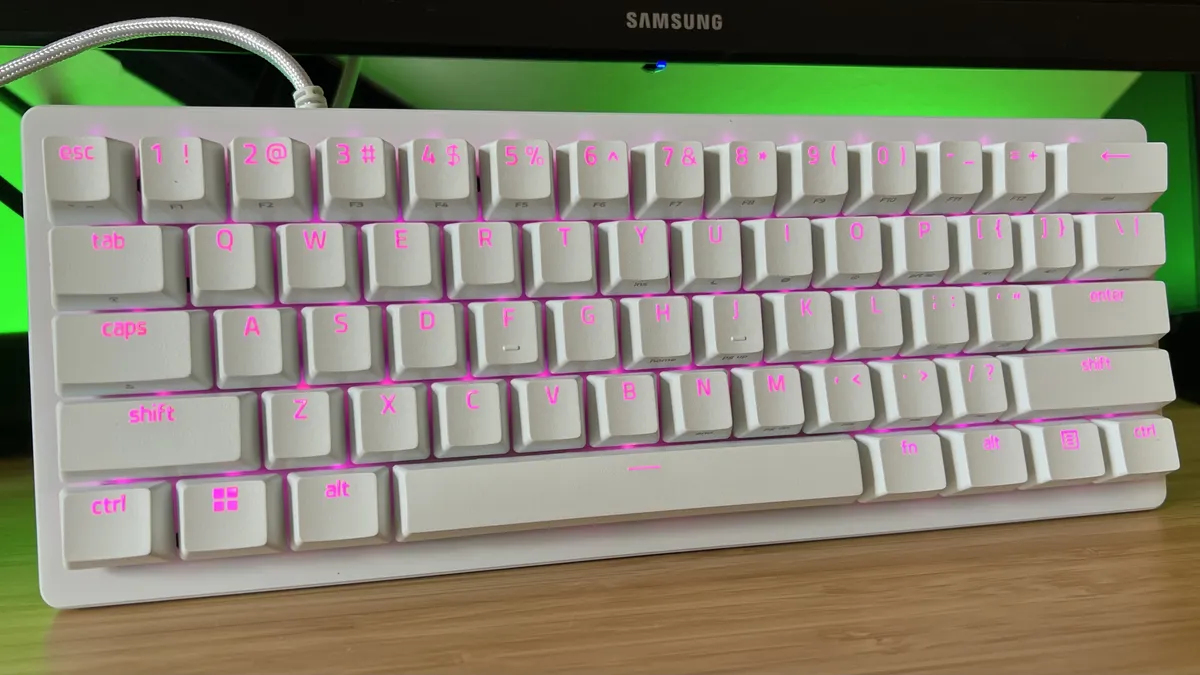


Don't want your deck to take up all your space? 60% keyboards are the smallest most players opt for, but the lack of arrow keys is often a drawback. If you're after the best compact Hall effect gaming keyboard, though, Razer uses its analog switches to make all those problems go away. The Huntsman V3 Pro Mini keeps things incredibly efficient, making good use of those dual-step actuation features to provide handy arrow functionality while still saving you space.
✅ You use a low mouse DPI in competitive games
✅ You don't want to sacrifice arrow keys
✅ You also play stealth and racing games
❌ A clean typing sound is a priority
❌ You need dedicated media controls
These are Razer's Analog Optical Switch Gen-2s, so we're not exactly playing with Hall effect clackers here. The fundamental benefits are still the same, though, with adjustable actuation from 0.1 to 4.0mm, dual-step inputs, and rapid trigger on board. There's another trick up this deck's sleeve, though.
Those analog switches can also mimic the finer controls of a thumbstick. Simply assign WASD to joystick controls in Synapse, and you've got an extra degree of control over just how far you're moving, or steering, or peering in-game. That comes in clutch for stealth titles in particular, but if you don't have a PC controller for racing games it's also far more accommodating.
It's not all roses in Razer's camp, though. The Razer Huntsman V3 Pro Mini has a particularly thin frame, which hasn't been stuffed with particularly high quality sound dampening. That means I hear a noticeable amount of echo and ping when hitting keys particularly hard. It's nowhere near as bad as mechanical keyboards used to be, but if you're used to a deeper thock it may well take you a second to get used to.
Opting for a smaller form factor also, naturally, means you lose dedicated media controls. Everything's mapped up to alternative keys here, but if you need access to your volume at all times it's something to consider.
Read more: Razer Huntsman V3 Pro Mini review
Speed | 4/5 |
Customization | 5/5 |
Typing feel | 3/5 |
Portability | 5/5 |
Comfort | 5/5 |
Controls | 5/5 |
The best full-sized Hall effect keyboard


Even the best Hall effect keyboards are power hungry, so it's a little rare to find a full-sized model that also sports a wireless connection. Ducky gets around that power draw by swapping over to inductive clackers. That means this is another not-strictly-HE keyboard, but it still has the same functions and features, with the added benefit of a cord-free setup.
✅ You need a full number pad
✅ You don't mind wiring in most of the time
✅ You prefer a softer typing feel
❌ You need a sturdy battery
❌ You want sophisticated software
Yes, this is a wireless gaming keyboard, but that max 15 hours of juice isn't going to get you too far. Instead, I'd recommend this deck primarily to those after a full-size keyboard rather than a cord-free one.
The extra cost of those inductive switches means full-sized decks are a little harder to come by, but the Ducky One X manages to squeeze a full rack of magnetic clackers into a $180 MSRP. Not only that, but it runs spectacularly.
There are a few sacrifices - awkward software means this is one you'll want to set and forget and there's no storage for onboard profiles. However, a gold-standard of sound dampening and a soft, smooth typing experience keeps the Ducky One X a step above its alternatives.
It's a slightly unique feel, almost padded out underneath the fingertips. That means you're not quite getting the energy or bounce of something like the Asus ROG Azoth 96 HE - it's more serene, like the mechanical Asus ROG Falchion RX Low Profile. I said that deck felt like typing on fresh snow, and the experience isn't too dissimilar here.
If you want the functionality of a Hall effect keyboard, but hate how they typically feel under the fingertips and don't want to sacrifice your extra keys this is absolutely where I'd be pointing you.
Read more: Ducky One X review
Speed | 4/5 |
Customization | 3/5 |
Typing feel | 5/5 |
Portability | 1/5 |
Comfort | 4/5 |
Controls | 2/5 |
The best hot-swappable Hall effect keyboard


For the slightly more expensive Cherry XTRFY MX 8.2 Pro TMR to make sense you'll need to be absolutely sure of two things; you need a wireless connection and you want the option to revert back to mechanical switches. A $249.99 / £209.99 MSRP doesn't put the Cherry deck at the top of the price range, but you're still spending a chunk of change on those extra features. For those hunting down a more versatile mechanical and magnetic option, this is a pretty unique proposition.
✅ You want the freedom to swap your switches
✅ You need a wireless connection
✅ You prioritize a sturdy typing feel
❌ You won't ever change your switches
❌ You don't need to drop the wire
Some of the best Hall effect keyboards claim they're hot-swappable, but looking into the fine print you'll find most are only compatible with a couple of magnetic options. Cherry's deck flips that completely, with support for both Hall effect and mechanical clickers. This is the first time I've seen cross-switch compatibility and it's pretty rare out there.
Elsewhere, the Cherry XTRFY MX 8.2 Pro TMR Wireless still holds up as a fantastic deck in its own right. With TMR sensors to keep that power slightly lower than more traditional options (and an 8,000mAh charge), the wireless battery life extends to a week of full-day use in my setup, with RGB switch on. Wireless magnetic decks are often falling far short of that benchmark.
The typing experience is as you'd expect from a Cherry deck, smooth, soft, and particularly well sound-dampened. There's just the right amount of resistance underneath each cap making for a speedy typing and gaming experience, especially when set at max sensitivity.
It's not, however, one for those who spend a lot of time in a keyboard's software. Cherry's downloadable program is far less intuitive than the rest of the market. Everything is still configurable and the app covers everything you'd need, but it's no looker and it can be difficult to parse each section's function. That's where the MX 8.2 Pro TMR loses most of its marks, but those building a more subtle setup will also want to check the strange logos emblazed across the space bar and top lip.
Read more: Cherry XTRFY MX 8.2 Pro TMR Wireless review
Speed | 5/5 |
Customization | 4/5 |
Typing feel | 5/5 |
Portability | 4/5 |
Comfort | 5/5 |
Controls | 3/5 |
How I test Hall effect keyboards

The first thing I do with any Hall effect gaming keyboard that passes my desk is dive into the settings. The day-one experience of setting up a deck is sacred, but a smooth setup is all the more important when magnetic switches are taken into account. Getting those actuation points right, setting up rapid trigger settings, and creating certain per-game presets is essential to getting your money's worth out of a Hall effect deck, and unintuitive software can sour the experience straight out the gate.
Once everything's set up I spend a week living, working, and playing with the deck as if it were my own. That means I'm playing the games on my current roster, using the keyboard for all my daily work, and running its battery, any additional displays, and macro keys as I would in my usual routines.
The second week of testing gets a little more intensive. Once I've settled into a deck, allowed muscle memory to take over, and got a feel for the switches, I'm going back into the settings and tearing everything apart. I test competitive performance in CS2 and Apex Legends, running each keyboard at its heaviest and lightest switch settings with rapid trigger enabled.

From there, any additional features not previously covered by my everyday use are explored further. Any joystick-like analog features, four-step trigger options, or extra macro buttons / display settings are put to work across both competitive and single player endeavours. I also complete three speed tests in TypingTest.com, each test is spent in medium text on a one minute run. Final typing speeds and accuracy measures are taken as an average.
This second week of testing is also spent with other Hall effect keyboards on the desk. I directly test against each keyboard's major competition, whether that's from a price or feature perspective.
Wireless Hall effect keyboards are charged fully at the start of testing and left to do their thing. I don't turn them off when I'm done for the day, and I'm running full brightness until the battery eventually dies. After that charge run, I lower the brightness to 50% for a second go and, where applicable, test that lifespan on an 8,000Hz connection.
For more information on how we test gaming keyboards, check out the full GamesRadar+ Hardware Policy.
Also Tested

Keychron Q1 HE 8K
Keychron's Q1 HE 8K is a more expensive version of the original Q1 model, but that hig-speed polling rate is only going to make sense for the top 1% of elite players. It's still a sturdy deck with that classic Keychron heft, but it's lacking in features compared to the competition.

Logitech G515 Rapid TKL
Listen, if you're after a low profile magnetic keyboard you knock yourself out. The Logitech G515 Rapid TKL makes that shorter stem feel a little too tight for dual-step keypresses, though, and its too-soft typing feel won't be for everyone.

Asus ROG Falcata
This is the most expensive gaming keyboard I've tested so far, but for a while there it was the top Hall effect dog. Now that the Azoth 96 HE is putting those switches to work in a more approachable layout and at a lower price point the Falcata is only recommendable to the true FPS elite.

Corsair K70 Pro TKL
Corsair had to break some eggs before it got to its Vanguard omelette. The K70 Pro TKL uses the brand's older MGX Hall effect switches and they're particularly tough going. This competitive 8,000Hz polling deck may well suit those after an esports keyboard with more switch customization, but the Vanguard offers a better experience overall.

Logitech G Pro X TKL Rapid
Value is certainly on the Logitech G Pro X TKL Rapid's side. This deck launched at a price much lower than the competition and still offers all the core features of a magnetic offering. That woolly Hall effect feel is very much present here, though, with a little too much tension in the keys compared to newer releases.

NZXT Function Elite MiniTKL
The NZXT Function Elite Mini TKL is a strange one. Visually striking (it's got its own aesthetic that nobody seems to have copied yet) and a particularly vibrant set of LEDs make for a great look. However, its Hall effect switches don't have the same full-depth span as the competition, only capping out at 0.6mm.

SteelSeries Apex Pro TKL Gen 3
There was a time when the SteelSeries Apex Pro TKL Gen 3 sat atop my gaming keyboard recommendation list, but it's been overtaken by newer models these days. Not all those clickers are magnetic and you'll find better value elsewhere.
How to choose a Hall effect gaming keyboard

So you know you want to dive into the world of magnetic switches - it's a pretty big world. To help you narrow down your choice, it's worth getting some early must-have questions out the way early.
First you need to work out how much you want to spend. These decks aren't cheap - you're likely looking at more than $100 no matter how many features you drop (Endgame Gear KB65HE excluded), but price scales with extras and you might not need all of them.
| Row 0 - Cell 0 | $50 - $100 | $100 - $200 | $200 - $250 | $250 - $350 |
Adjustable actuation points | ✅ | ✅ | ✅ | ✅ |
Rapid trigger | ✅ | ✅ | ✅ | ✅ |
Sound dampening | ✅ | ✅ | ✅ | ✅ |
Dual-step triggers | ❌ | ✅ | ✅ | ✅ |
Smoother switches | ❌ | ❌ | ✅ | ✅ |
Four-step triggers | ❌ | ❌ | ❌ | ✅ |
Wireless connection | ❌ | ❌ | ❌ | ✅ |
The above table isn't a hard line, it's just an approximation based on what I've seen so far. There will absolutely be outliers to these but in general you'll find that the mid-range sits between $100 and $200 for a magnetic deck, with the move to $250 opening you up to better feeling switches overall. That's a lot higher than a mechanical option.
This is the point when you need to decide how important typing feel is. If you're just going for the core features of magnetic switches, and don't use your keyboard for hours of everyday work in between play sessions it's worth sticking to the low end of the $100s. That's where you'll find some of the best value on the market.
If you know you'll need to take your keyboard with you on your travels, or you're happy to invest in a wire-free setup a cordless connection is going to cost you. You can start to drop the wire at around $250, with better battery lives available in the $300+ region.
FAQ

What is a Hall effect keyboard?
A Hall effect gaming keyboard is a deck that uses magnetic switches rather than mechanical, optical, or membrane ones. Essentially, these clackers allow the keyboard to rely on degrees of input, rather than the simple on/off actuation you'll find elsewhere. A Hall effect deck doesn't just know that you want to register a keypress, it knows how far down the press you are and can be adjusted accordingly.
That's a barebones explanation, and there are many other sensor types that operate in a similar manner. For more information, see my full guide to what a Hall effect gaming keyboard is.
How do Hall effect keyboards work?
Hall effect keyboards measure a magnetic field underneath each key rather than a simple circuit like a mechanical deck. Where a mechanical keyboard registers a keypress when a contact is physically pushed into place, a magnetic keyboard uses sensors in the PCB to detect how far down you're pushing each key. As the switch is pressed, these sensors read the position of the magnet and react accordingly, registering a press when the key hits a determined (and adjustable) position.
Are Hall effect keyboards worth it?
Hall effect keyboards are worth it if you're a particularly fast player in need of incredibly high switch sensitivity. Because these decks allow not just for customizable actuation points, but for that personalization to be applied on a per-key basis, they're most often used to maintain speed on certain keys while avoiding accidental presses on others.
Additional features like rapid trigger double down on this speed by dynamically adjusting reset points. Essentially, as soon as you lift your finger slightly for a repeat press your keyboard is ready to receive another input.
If you're not a competitive player, the high price tag of a Hall effect keyboard might not make sense. There's certainly value in dual-step actuations in certain non-competitive scenarios, but they're more niche and take some considerable learning.
Take a look at the best membrane gaming keyboards and best hot-swappable keyboards for a different deck flavor.

