





Anyone who uses a computer or tablet for a creative task, knows how fiddly high-intensity edit or creative works can be. You'll spend half of the time clicking between different tools and icons on your software, unless you have a creative console to set up shortcuts.
Buying a device like this is much easier for a limited time, because the TourBox Creative Console is up to 30% off via the brand's own website. This lets you pick up one of the brand's various devices for a reduced price, with some costing as little as $85 thanks to the new discounts.
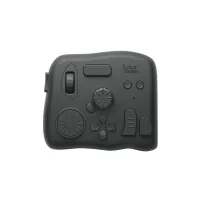
The TourBox Elite, unlike some of the brand's other models, offers wired or Bluetooth connection, to a PC or Mac. You'll need to get the Elite Plus to connect to tablets, and that's enjoying a 15% discount too.
It allows for over 150 button combos and 400 preset functions per button, and its antibacterial coating means it's designed not to get dirty when you're taking it on the road.

The TourBox Lite has slightly fewer buttons and options than the Elite model, which justifies its lower price. It misses out on the dial, as well as D-pad.
At its core, it's a similar product though, so it's perfect for someone who needs some extra features on their Mac or PC, without the entire roster offered by the Elite.
Should you buy a TourBox console?
A device like the TourBox Elite or Lite is designed for creative professionals. The intended use case, is to let you quickly enable shortcuts, without involved keyboard key combinations or clicking on icons.
For example, while you're editing a video, you can quickly use a shortcut to change what the mouse curser does, from selecting a clip to cutting it or healing a cut. When you're drawing in an art app, you can use the console to change the orientation or zoom of an image while you continue to draw.
TourBox's devices work alongside apps like Premiere Pro, Davinci Resolve, Lightroom and Photoshop, with some models also working on tablet apps.
If you're not a creative, a device like this won't do much for you. But many professionals I know have devices like the TourBox, and it's worth it if creative tasks are your bread and butter.
If you want more creative devices at a discount, we're monitoring the Prime Day iPad deals for bargains. For those of you who'd rather play, we've also got a round-up of Prime Day Lego deals on all kind of set.

