Join The Community





Steam Machine is still AWOL on the shelves, some four months after its original announcement. Valve has addressed the silence, stating it originally intended to have price and availability information for us way back in February - but still nada. It's not surprising. Current component shortages are putting MSRPs all out of whack, with RAM and storage (and soon CPU) supplies dwindling and prices skyrocketing across the industry.
Anyone who already has a Steam Deck is already about halfway there, though. Yes, the Steam Machine will likely greatly improve on the overall power you'll have at your fingertips, but the handheld device only needs a few extra gadgets to offer up a similar big-screen experience today. The best Steam Deck docks can throw your games up on the TV with plenty of extra ports for storage and accessories. Not only that, but there are plenty more Steam Deck accessories to refine the experience.
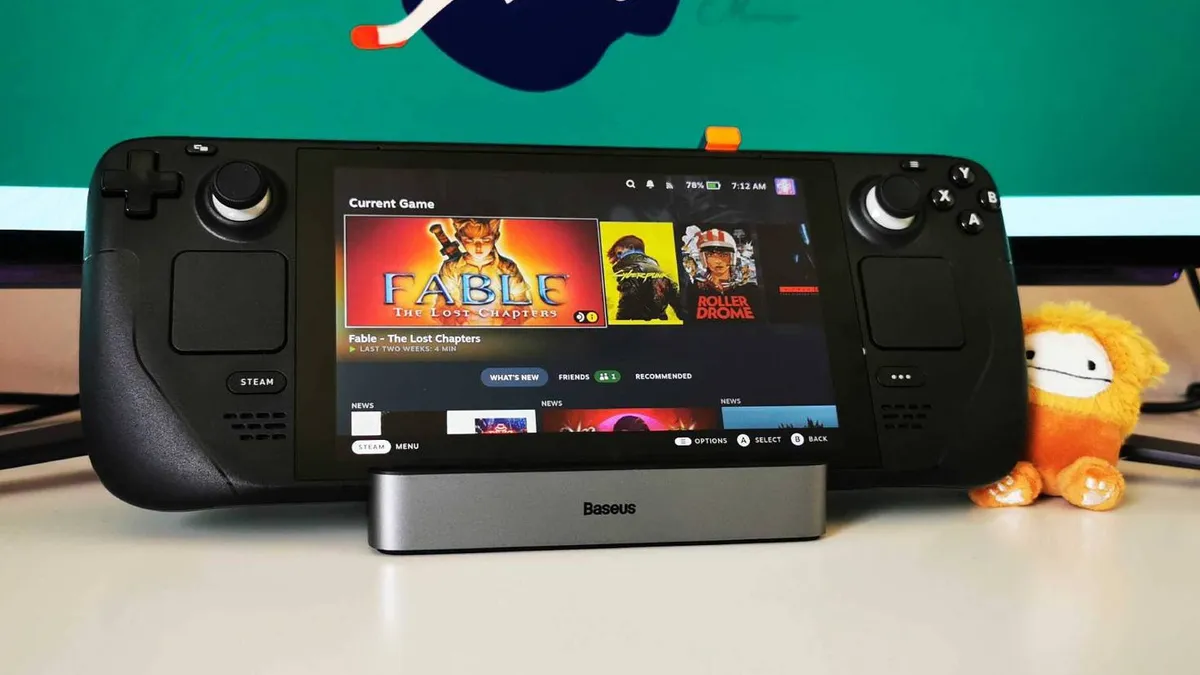
Baseus 6-in-1 Steam Deck dock
What we loved
- High quality build
- Adjustable stand
- Folds neatly away
- Maintains power with accessories connected
What to consider
- All connections are to the rear
The Baseus 6-in-1 docking station doesn't offer the widest array of connections, but you're still covered for a controller, keyboard and mouse - and we never noticed any power drops when everything was hooked up and running. Yes you'll find full-PC docks out there with up to 20 outlets for who-knows-what accessories, but in a Steam Machine-like living room setting this is the perfect balance between functionality and compact design.
You're getting three USB-A ports and one USB-C port to play with, and an HDMI 2.0 connection for up to 100W of power delivery. The dock is designed to output at 4K 60Hz, like the Steam Machine, but considering the handheld's power you may well be scaling down your resolution to keep all but the lightest games playable.
Crucially, the whole thing is just well made. It's sturdy, solid, and hasn't let us down in over a year of continued testing. There's even a handy foldable stand (fully adjustable for the Steam Deck) that can tuck out of view when not in use.
Asus ROG Raikiri Pro

What we loved
- Easy Bluetooth connection (and 2.4GHz)
- Sturdy battery life
- Gorgeous design
What to consider
- Screen could be doing more
- There are better back buttons out there
The Asus ROG Raikiri Pro has found its home in the GamesRadar+ Steam Deck setup. That's because of that handy Bluetooth connection, fantastic design, and solid battery life. While its back buttons can't quite keep up with the competition and there must be something else Asus can do with that onboard display, this is still our go-to recommendation for those building a Steam Machine setup out of a Deck.
You're essentially getting an Xbox-feeling controller with the extra spice of pro features. Trigger locks, mapping, and profile presets can all be set within Asus's Armoury Crate app, with some features toggled via the OLED panel itself. That's great for on-the-fly hopping on Steam Deck, especially if you want as little time in software as possible.
We've been running this controller specifically with Steam Deck for a couple of years now and that 48 hour battery life holds up. Sharing between devices using the dual 2.4GHz and Bluetooth connections is easy going as well.
Razer Joro

What we loved
- Tactile switches
- Super slimline form factor
- Long battery life
- Easy Bluetooth connection
What to consider
- Fatigue during longer typing sessions
- Not as fast as 2.4GHz
The Razer Joro is a slimline gaming keyboard that feels tailor made for the Steam Deck but also avoids all the pitfalls often associated with these 'living room' devices. It's pictured above with an Asus ROG Ally but gets on just fine with either system and offers an incredibly satisfying typing experience without the bulk of a more permanent keyboard.
Unlike most mushy, rattly keyboards you'll find in this portable category, the Joro uses Razer's scissor switches for a super satisfying, tactile typing experience. It's a little heavier than the chiclet deck you might find on a laptop, which means anyone typing for hours at a time may feel a little fatigue. For gaming on your lap though? It's easily the best gaming keyboard for the job.
A sturdy battery life and Bluetooth connection means you can keep this one cable (and dongle) free for a considerable amount of time, though that drop away from 2.4GHz won't suit more competitive players. It certainly makes for an easier setup, though. Whether you're at home with your dock or on the road, just turn the deck on and you're away.
SteelSeries Rival 3 Wireless Gen 2

What we loved
- Easy 2.4GHz and Bluetooth connectivity
- Nicely textured shell
- Plenty of extra software features
- Removable battery can come in handy
What to consider
- No rechargeable battery
- Thinner side buttons can be tricky to hit
That removable battery is both a blessing and a curse for the SteelSeries Rival 3 Wireless Gen 2. Whether you love the flexibility it provides or hate the lack of cable charging, though, this cheaper rodent feels particularly well suited to the Steam Deck.
With up to 450 hours of Bluetooth battery at your disposal you're going to be sorted for quite some time before you'll need to swap over, but being able to go from 0 to 100% in just a few seconds can come in surprisingly useful with a handheld.
Not only that, but the Rival 3 also comes with 2.4GHz options - it's rare for a gaming mouse this cheap to go for both. Go for Bluetooth when you're out and about and 2.4GHz when you're on the couch and you're sorted for both speed and versatility here.
The actual build is surprisingly sturdy for the price (I just wish those side buttons were a little thicker) with a textured surface that feels fantastic in the hands.
For more setup gadgets, check out the best gaming headsets and best gaming monitors on the market. We're also rounding up the best Xbox Series X controllers for more options.

You must confirm your public display name before commenting
Please logout and then login again, you will then be prompted to enter your display name.